Technical support +49 (0) 511 / 16 59 672-5 Mo-Fr 10:00-14:00 (UTC+2)

IC200-MBUS-LW M-BUS to LoRaWAN converter

SKU: IC200-MBUS-LW
The IC200-MBUS-LW device is designed to connect to existing equipment with an M-Bus protocol, followed by data transmission over a LoRaWAN network for monitoring and optimization of resource usage, such as water, heat, electricity, and gas, where the device connects to corresponding meters to collect data for subsequent analysis and reporting.
The device is powered by a battery with the option to connect an external DC power source.
LoRaWANPulse InputSecurity InputDigital InputNFCBluetooth5…30 VDCAndroidBatteryAmbient temperatureIP65

* Required Fields

- +
Product Description
    Details

    Main features

    • LoRaWAN 1.0.4 class A, С
    • Power Supply: Batteries and 5… 30 V DC
    • Activation method: ABP / OTAA
    • Activation: NFC
    • Device setup: Mobile App via Bluetooth LE
    • 1 x DI (status/pulse) and 1 x DO (open collector)
    • Up to 10 M-Bus slave devices

    Applications

    • Integration up to 10 existing utility meters in to wirless LoRaWAN network
    • Organize the wireless monitoring the statuse of 1 remote device
    • Organize the wireless control of 1 remote operating unit

    Technical data

    Data transfer interface

    Data transmitting technology

    LoRaWAN 1.0.4 class A, С

    Frequency Bands

    EU868 (US915 and others — by request)

    ADR support

    yes

    Transmission power, max.

    +20 dBm

    Receiver sensitivity

    -137 dBm

    Communication period

    1, 5, 10, 30 min; 1, 4, 6, 12, 24 hours

    Memory capacity for storing packets

    20 000 packages

    Transmitter power, max.

    100 mW

    Activation method in the LoRaWAN network

    ABP / OTAA

    Antenna type

    Internal / External (by request)

    Encryption algorithm

    Hardware AES-128

    Configuration interfaces

    Device identification

    NFC-A

    Device setup

    Bluetooth LE 5.1

    Configuration software

    Mobile app

    akYtec IoT Configurator

    M-Bus

    Number of ports

    1 pcs

    Number of M-Bus slave devices

    Up to 10 pcs

    Digital/Pulse input

    Operating mode switching

    software

    Number

    1 pcs

    Frequency of registered pulses, max., Hz

    100 (200 Hz, with additional EMI protection)

    Internal pull-up to device power supply

    yes

    ESD protection

    yes

    Type of connected devices

    "dry" contact, open collector

    Digital output


    Number

    1 pcs

    Load current, no more than

    1 A

    Switching voltage

    Up to 24 V DC

    Type of digital output

    Open collector

    Memory

    Memory type

    flash

    Built-in memory capacity

    8 MB

    Power supply

    Battery voltage

    3 V

    Battery type

    2 х CR123A

    Total battery capacity

    3000 mAh

    Autonomous operation time

    Up to 5 years, depending on settings

    External DC power supply

    5…30 V

    Mechanical

    Color

    RAL 7035 (light gray)

    Material

    ABS+PC plastic

    IP code

    IP65

    Dimensions

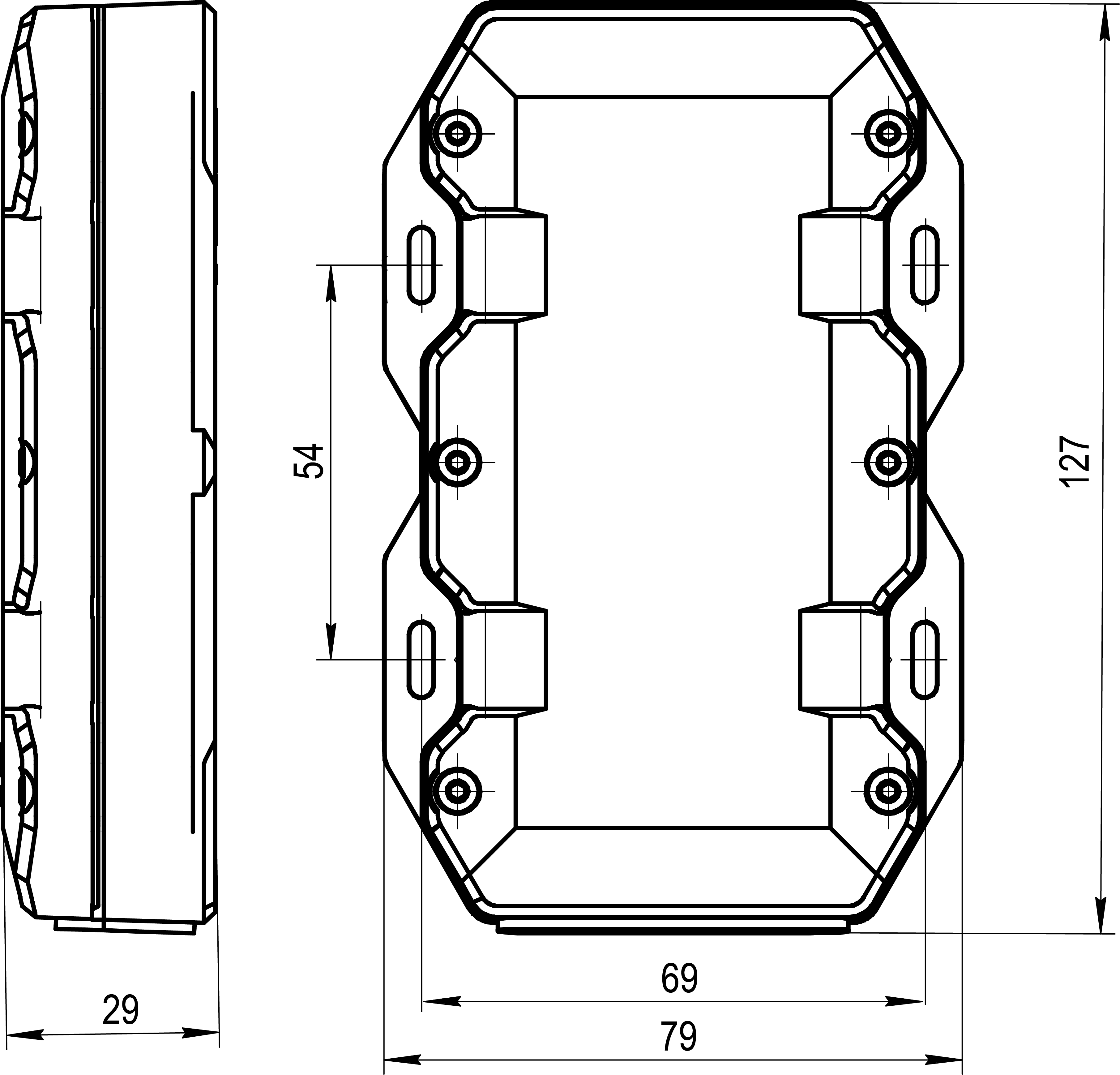
    129 х 79 х 29 mm

    Weight, max.

    approx. 195 g

    MTBF

    50 000   hours


    IC200 Dimensions
Additional Information
FAQ

    FAQ

    What is LoRaWAN?
    LoRaWAN (Long Range Wide Area Network) is a special technology for wireless data transmission over long distances with very low power consumption. It is ideal for devices that run on batteries for years and transmit small amounts of information, such as meter readings or sensor data.
    Why do I need LoRaWAN devices?
    Our LoRaWAN devices allow you to remotely collect data from various meters (water, gas, electricity) or other industrial devices using wireless communication. This is convenient for automated data collection, monitoring, and control, without the need for wiring.
    What devices do you offer?

    We offer four main types of LoRaWAN devices:

    1. LoRaWAN Pulse Counter: Used to collect data from any meters that generate pulses (e.g., water or electricity meters).
    2. LoRaWAN Pulse Counter for Elster Gas Meter: A specialized device for reading data from Elster gas meters.
    3. LoRaWAN M-BUS Converter: Allows connecting M-BUS protocol devices (often heat or water meters) to the LoRaWAN network.
    4. LoRaWAN MODBUS Converter: Designed to integrate industrial devices with a MODBUS interface (e.g., sensors or controllers) into the LoRaWAN network.
    What are DevEUI, AppEUI, and AppKey?
    These are unique identifiers and keys required for your LoRaWAN device to connect to the network and securely transmit data. DevEUI is the unique number of the device itself, AppEUI is the application identifier, and AppKey is the secret key for activation.
    Where can I find my device's DevEUI and other identifiers?
    These identifiers are located on a sticker on the device itself and/or on its packaging. They are presented as a QR code, which can be easily scanned with a mobile phone. Also, after connecting the device, you will be able to see this data in the mobile application.
    How do I configure my LoRaWAN device?
    Configuring our LoRaWAN devices is very simple — using a special mobile application on your Android smartphone via Bluetooth. Simply install the application, enable Bluetooth on your phone, and follow the instructions in the application.
    Can I configure the device with an iPhone?
    Currently, our mobile configuration application is only available for Android devices. An Apple iOS version is planned for future release. Stay tuned for our updates!
    My device is not turning on. What should I do?
    Make sure the device is properly connected to a power source (if it's not battery-powered) or that the batteries are correctly installed and not discharged.
    Important: The device is shipped in an inactive (hibernation) mode for storage and transportation. To put the device into operation, this mode must be disabled. Device activation is performed using NFC: you need to bring your smartphone close to the device with NFC technology enabled. After this, further configuration via Bluetooth using the mobile application becomes possible.
    My phone doesn't see the device via Bluetooth. What's the problem?
    Make sure Bluetooth is enabled on your Android smartphone. Try bringing your phone closer to the device. Also, check if you have granted the mobile application the necessary permissions to use Bluetooth in your phone's settings.
    Do I need an internet connection for the LoRaWAN device to work?
    The LoRaWAN device itself does not require a direct internet connection. It transmits data to LoRaWAN gateways, which are already connected to the internet and send data to the server. An internet connection is not needed to configure the device via the mobile application, but it will be required to view data on the server.
    How often does the device send data?
    The frequency of data transmission depends on the device settings and the type of meter. This is configured via the mobile application. Remember that the more often the device sends data, the faster the battery drains.
    Can I use the device outdoors?
    Most of our LoRaWAN devices have a dust and moisture-protected casing, allowing them to be used both indoors and outdoors. However, always check the IP protection class specified in the characteristics of the specific device to ensure its suitability for outdoor conditions.
    Can an unauthorized person configure the device?
    No, device configuration is password-protected. Without knowing the password, access to settings is impossible.
    What is the default password for device configuration?
    The default password for device configuration is “1111”.
    Can the device firmware be updated remotely?
    Currently, remote firmware update functionality (FUOTA - Firmware Update Over The Air) is not supported. Firmware updates are performed locally.
    What is the IC200-MBUS-LW converter for?
    IC200-MBUS-LW is designed to connect devices with an M-Bus interface (e.g., heat, water, electricity meters) to the LoRaWAN network. This allows collecting data from these devices and transmitting it over a wireless network.
    How many M-Bus devices can be connected to one converter?
    Up to 10 slave devices can be connected to one IC200-MBUS-LW converter via the M-Bus bus.
    What powers IC200-MBUS-LW?
    The device can be powered either by an internal battery (up to 5 years of autonomous operation) or by an external DC power source with a voltage from 5 to 30 V.
    Does the power type affect LoRaWAN operation?
    Yes, when powered by battery, the device operates in LoRaWAN Class A (energy-efficient mode). When connected to external power, the device can operate in LoRaWAN Class C, which provides continuous air listening and faster command delivery.
    Can IC200-MBUS-LW be used outdoors?
    Yes, the converter has an IP65 enclosure protection rating and can operate at temperatures from -40 to +85 °C, allowing it to be used outdoors.